Counting Words in a File

One solution for this problem:

import java.io.BufferedReader;
import java.io.File;
import java.io.FileReader;
import java.util.HashMap;
import java.util.Map;
import java.util.StringTokenizer;
import java.util.TreeMap;

public class WordCounter {
    Map<String, Integer> words = new HashMap<String, Integer>();

  private void addWord(String word) {
        if (words.get(word.toLowerCase()) == null) {
            words.put(word.toLowerCase(), 1);
        } else {
            words.put(word.toLowerCase(), words.get(word.toLowerCase()) + 1);
        }
    }

  private void displayWords() {
        Map<String, Integer> sortedWords = new TreeMap<String, Integer>(words);
        for (String word : sortedWords.keySet()) {
            System.out.println(word + ": " + sortedWords.get(word));
        }
    }

  private String stripCharacters(String word) {
        return word.replaceAll("[\\\\.,]$", "");
    }

  private void parseLine(String line) {
        StringTokenizer tokenizer = new StringTokenizer(line);
        while (tokenizer.hasMoreTokens()) {
            addWord(stripCharacters(tokenizer.nextToken()));
        }
    }

  private void parseFile(String filename) {
        try {
            BufferedReader reader = new BufferedReader(new FileReader(new File(filename)));

          String line;
            while ((line = reader.readLine()) != null) {
                parseLine(line);
            }
        } catch (Exception e) {
            e.printStackTrace();
        }
    }

  public void countWords(String filename) {
        parseFile(filename);
        displayWords();
    }

  public static void main(String[] args) {
        new WordCounter().countWords("input.txt");
    }
}

As mentioned somewhere else, I dislike Scanner, I much prefer doing my own parsing with StringTokenizer… But I’m sure there would be much betters solutions with Scanner.

The key methods here are parseLine, which breaks up lines into words, and addWord which adds a word to the words map if it is not there yet, or increments the counter if it is.

instanceof

instanceof is a binary operator that checks if an instance is of a certain type. You use it this way:

String tmp = "hello";
if (tmp instanceof String) {
  // ... do things
}

On the left-hand side, you have the instance, and on the right-hand side, you have the type. As all classes are descendants of Object, all instances except for null, return true when instanceof’ed with Object.

Here are the most obvious usages in this test case:

import static org.junit.Assert.*;
import org.junit.Test;

public class TestInstance {
    interface Interface {

    }

    class InterfaceImpl implements Interface {

    }

    class SubInterfaceImpl extends InterfaceImpl {

    }

    enum AnEnum {
    ENUM_ELT
    }

    @Test
    public void testInstanceOf() {
    assertFalse(null instanceof Object);

  // The following statements do not compile
    // assertTrue(null instanceof null);
    // assertTrue(1 instanceof int);
    // assertTrue(1 instanceof Integer);

  assertTrue("Hello" instanceof String);

  assertTrue(new InterfaceImpl() instanceof Object);

  assertTrue(new InterfaceImpl() instanceof Interface);
    assertTrue(new InterfaceImpl() instanceof InterfaceImpl);

  assertTrue(new SubInterfaceImpl() instanceof Interface);
    assertTrue(new SubInterfaceImpl() instanceof InterfaceImpl);
    assertTrue(new SubInterfaceImpl() instanceof SubInterfaceImpl);

  assertTrue(new InterfaceImpl[5] instanceof InterfaceImpl[]);
    assertTrue(new InterfaceImpl[5] instanceof Interface[]);

  assertTrue(new java.util.ArrayList<Interface>() instanceof java.util.ArrayList);
    assertTrue(new java.util.ArrayList<Interface>() instanceof java.util.List);
    assertTrue(new java.util.ArrayList<Interface>() instanceof java.util.Collection);

  // but the following statements do not compile:
    // assertTrue(new java.util.ArrayList<Interface>() instanceof java.util.ArrayList<Object>);
    // assertTrue(new java.util.ArrayList<Interface>() instanceof java.util.ArrayList<Interface>);
    // whilst these do:

  assertTrue(new java.util.ArrayList<Interface>() instanceof java.util.ArrayList<?>);
    assertTrue(new java.util.ArrayList<Interface>() instanceof java.util.List<?>);
    assertTrue(new java.util.ArrayList<Interface>() instanceof java.util.Collection<?>);

  assertTrue(AnEnum.ENUM_ELT instanceof AnEnum);
    }
}

Generally speaking, instanceof is to be avoided as checking the type of an object before performing tasks with it is a code smell, and a sign that something is wrong in the design and should be refactored. Typically used with a cast right after:

public class Monster {
  // ...
}

public class BeheadedGiantPangolin extends Monster {
  public void yellAndPokeOpponentEyes(Monster m) {
    // ...
  }
  // ...
}

public class KillerBloodThirstyBunny extends Monster {
  public void drinkBlood(Monster m) {
    // ...
  }
  // ...
}

// ...
if (monster instanceof BeheadedGiantPangolin) {
  BeheadedGiantPangolin pangolin = (BeheadedGiantPangolin)monster;
  pangolin.yellAndPokeOpponentEyes(otherMonster);
} else if (monster instanceof KillerBloodThirstyBunny) {
  KillerBloodThirstyBunny bunny = (KillerBloodThirstyBunny)monster;
  bunny.drinkBlood(otherMonster);
}

Here the obvious problem is that polymorphism should be used:

public class Monster {

    public void attack(Monster m) {

    }

    public static void main(String[] args) {
    Monster monster = new BeheadedGiantPangolin();
    Monster otherMonster = new KillerBloodThirstyBunny();

  monster.attack(otherMonster);
    }
  // ...
}

public class BeheadedGiantPangolin extends Monster {
    public void attack(Monster m) {
    yellAndPokeOpponentEyes(m);
    }

    public void yellAndPokeOpponentEyes(Monster m) {
    // ...
    }
}

public class KillerBloodThirstyBunny extends Monster {
    public void attack(Monster m) {
    drinkBlood(m);
    }

    public void drinkBlood(Monster m) {
    // ...
    }
}

However, in some situations, you do have to use instanceof, or check the type of an object. And this is the purpose of this post.

The most notable “problem” about instanceof is that it is not dynamic: you cannot put the type into a variable to do something like:

Type type = KillerBloodThirstyBunny;
// ...
if (monster instanceof type) {
  // ...

There is however another way.

Class.isInstance

Class.isInstance [1] is the “dynamic equivalent” of instanceof. And we can verify this quite easily:

import static org.junit.Assert.*;

import org.junit.Test;

public class TestIsInstance {
    interface Interface {

    }

    class InterfaceImpl implements Interface {

    }

    class SubInterfaceImpl extends InterfaceImpl {

    }

    enum AnEnum {
    ENUM_ELT
    }

    @Test
    public void testInstanceOf() {
    assertFalse(Object.class.isInstance(null));

  assertTrue(Integer.class.isInstance(1));
    assertTrue(String.class.isInstance("Hello"));

  assertTrue(Object.class.isInstance(new InterfaceImpl()));

  assertTrue(Interface.class.isInstance(new InterfaceImpl()));
    assertTrue(InterfaceImpl.class.isInstance(new InterfaceImpl()));

  assertTrue(Interface.class.isInstance(new SubInterfaceImpl()));
    assertTrue(InterfaceImpl.class.isInstance(new SubInterfaceImpl()));
    assertTrue(SubInterfaceImpl.class.isInstance(new SubInterfaceImpl()));

  assertTrue(InterfaceImpl[].class.isInstance(new InterfaceImpl[5]));
    assertTrue(Interface[].class.isInstance(new InterfaceImpl[5]));

  assertTrue(java.util.ArrayList.class.isInstance(new java.util.ArrayList<Interface>()));
    assertTrue(java.util.List.class.isInstance(new java.util.ArrayList<Interface>()));
    assertTrue(java.util.Collection.class.isInstance(new java.util.ArrayList<Interface>()));

  assertTrue(AnEnum.class.isInstance(AnEnum.ENUM_ELT));
    }
}

We even get to test whether 1 is an instance of Integer. However, this is not valid:

assertTrue(java.util.ArrayList<?>.class.isInstance(new java.util.ArrayList<Interface>()));

So now, it is possible to dynamically assign the class to a variable to test the instance:

Class aClass = BeheadedGiantPangolin.class;
if (aClass.isInstance(monster)) {
// ...

^{1} This reminds to broadcast the message: for the love of God, please link to the javadoc for java 6 onwards!! Fed up of getting 1.4 results when googling a class…

Import on Demand

In Java, there are two ways of importing classes: by importing the class directly, or by using what we call import on demand. Import on demand uses the * wildcard:

import java.util.*;
import java.io.*;

A class belonging to a package imported on demand will be loaded only if it is actually referenced in the code, so there is no impact on the size of the resulting app. There is also no impact on the execution performance.

The reason for this is that when compiling a class, all the import-on-demand statements are actually replaced with the class import. This is very obvious when compiling a class, and then decompiling it. Say you have the following class:

import java.util.*;

public class TestImport {
  public static void main(String[] args) {
    List<Integer> list = new ArrayList<Integer>();
    list.add(1);
    list.add(2);
  }
}

This class only uses java.util.List and java.util.ArrayList in the java.util package. Once decompiled, here is what the class looks like:

import java.util.ArrayList;
import java.util.List;

public class TestImport
{

    public TestImport()
    {
    }

    public static void main(String args[])
    {
        ArrayList arraylist = new ArrayList();
        arraylist.add(Integer.valueOf(1));
        arraylist.add(Integer.valueOf(2));
    }
}

The two classes are now imported directly (we talk about “single type import”). So the class you would execute would be identical to the one written with single type imports, therefore no impact on performance is to be expected. The only impact would potentially be on compilation time, but I must admit (a) I never got the chance to actually measure the delta, which is more than likely negligible anyway, and (B) I don’t really care.

The (Silly) Locker Problem

This problem is a recurrent one in the Java forum: the locker problem. Imagine the scene: one morning, the principal decides to carry out an experiment with the 1,000 lockers, and her 1,000 students: she asks student 1 to go down and open all lockers; student 2 to close every second lockers; student 3 to go through every third locker, and close it if it’s open, or open if it’s closed (student 3 must be passably more intelligent than his 2 previous friends), etc. ; student n to go through every n locker, and open it if it’s closed, or close it if it’s open.

The question is, how many lockers are open after the 1,000 students have completed their stupid task? (and do they get extra points at the end of the year?).

The code solution is pretty simple: you just need to loop through every student, and for every locker, if the student number divides the locker number (i%n = 0=), just revert the locker state by not’ing the boolean. All that remains is to count the true in the aray.

public class Lockers {
    public static void main(String[] args) {
    final int lockersNumber = 100;

  // All lockers are closed at beginning of this silly experiment.
    boolean[] lockers = new boolean[lockersNumber];
    // Students
    for (int n = 1; n <= lockersNumber; n++) {
        // Lockers
        for (int i = 1; i <= lockersNumber; i++) {
        if (i%n == 0) {
            lockers[i-1] = !lockers[i-1]; 
        }
        }
    }

  // Let’s now check how many lockers are open
    int openLockers = 0;
    for (int i = 0; i < lockersNumber; i++) {
        if (lockers_) {
        openLockers++;
        }
    }

  System.out.println(openLockers);
    }
}

The code above just simulates the students going down the hall, and opening and closing the lockers. But this exercise is also a mathematical one, whose result is pretty much well known: the number of open lockers is the number of squares below the total number of lockers. For example, below 1,000, with Ruby, we find:

irb(main):001:0> puts (1..1_000).to_a.select{ |n| Math.sqrt(n).floor == Math.sqrt(n) }.size
31

There are 31 squares. Which happens to be the solution returned by the Java class defined above. Fewww!

Merging Array of Primitives

This is (supposedly) a trivial question: how to merge 2 arrays of primitives, avoiding duplicate elements?

One simple option is to create an ArrayList, and add the elements one by one, making sure you’re not adding an element that already exists in the list. Another one, simpler again, is to use a Set, and add the elements one by one: the Set (such as HashSet) ensures there is no duplicate.

But you want to avoid loops, and adding elements one by one. You want to use addAll. and that’s where the fun begins.

There is no auto(un)boxing of arrays in Java; in other words, int[] doesn’t automagically become Integer[], and Integer[] doesn’t become int[]. This means you have to do it yourself, by doing something like:

private static Integer[] toObjectArray(int[] array) {
       Integer[] objectArray = new Integer[array.length];

     int index = 0;
       for (int i: array) {
           objectArray[index] = i;
           index++;
       }

     return objectArray;
   }

 private static int[] toPrimitiveArray(Integer[] objectArray) {
       int[] array = new int[objectArray.length];

     int index = 0;
       for (int i: objectArray) {
           array[index] = i;
           index++;
       }

     return array;       
   }

The other possibility is to use Apache Commons Lang.

Once you have this, the original assignment is straightforward:

public class MergeArrays {

      // Previous methods toObjectArray and toPrimitiveArray...

  public static void main(String[] args) {
        int a[] = { 5, 6, 7, 8, 9 };
        int b[] = { 1, 2, 3, 4, 5, 6, 7, 8 };

      Set<Integer> set = new HashSet<Integer>();
        set.addAll(Arrays.asList(toObjectArray(a)));
        set.addAll(Arrays.asList(toObjectArray(b)));

      int c[] = toPrimitiveArray(set.toArray(new Integer[set.size()]));
        System.out.println(Arrays.toString(c));
    }
}

Post-Season Fun: Christmas Tree with *

I know this comes a bit late, but this made me want to give it a bash in Ruby… So here is my Christmas tree with ‘*’ in Ruby.

WIDTH = 10

(1..3).each do
  |j|
  1.step(WIDTH, 2) do
    |i|
    # This if truncates the top of the triangles for level 2 and 3.
    if not(j>1 and i==1)
      ((WIDTH-i)/2).times{ print " "  }
      i.times{ print "*" }
      puts ""
    end
  end
end
(1..3).each do
  |i|
  ((WIDTH-3)/2).times{ print " " }
  3.times{ print "*" }
  puts ""
end

This gives:

    *
   ***
  *****
 *******
*********
   ***
  *****
 *******
*********
   ***
  *****
 *******
*********
   ***
   ***
   ***

Oooooh!

Ruby Arrays: Cloning and Rotating

Whilst working on problem 68 of Project Euler, I have encountered 2 interesting issues. The first one was cloning a multi-dimensional array, and the second one rotating an array.

Here is the problem I met with cloning:

a = [[0,0],[0,0]]
b = a.clone
b[0][0] = 1 # Update b array
puts a # print a

And this prints out:

1,0,0,0

What?! Did I not clone array a, then? Well, I had forgotten that the clone method doesn’t do a deep copy, and therefore the arrays within the array are still references. Therefore, à la Java, if I update an array, I end up updating the other one. So I had to create my own array_copy function:

def array_copy v
  a = []
  v.each{ |e| a << e.clone }
  a
end

Now, the rotation of the array was more trivial after finding this

num.times{ a << a.shift }

Neat! :)

I used a backtracking algorithm to solve this problem 68, and I’m pretty satisfied with it, but I think it can do with a bit of clean up… This brings me to 71 solved!

NetBeans Strikes Back

I am more and more impressed with NetBeans.

I remember toying a long time ago with Forte for Java when it was still a young project. Then I switched to what was at the time the Rolls of the IDEs, Visual Age for Java, whose repository was a royal pain in the arse.

Forte for Java subsequently became NetBeans, and Visual Age had a second birth with the advent of Eclipse. Ever since, I have been using Eclipse which was without contest the best: completion, debugging, nifty Tomcat integration with the Sysdeo plugin, cool profiler, etc.

Now, with more recent versions of Eclipse, getting a J2EE app to run smoothly within Eclipse, with no reloading of classes and all the bells and whistles is a nightmare, and installing TPTP to profile applications is quite a feat (I haven’t managed yet, because I had to give up at one point or another because of plugin dependencies, dodgy proxy, and instabilities in the atmospheric pressures – and I’m not patient).

Recently, I had therefore to turn back to NetBeans because its profiler doesn’t take a Ph. D and the hacking of your corporate proxy to install: it comes integrated. And that’s one of the things that actually got my attention: there is no plugin version and dependencies nightmare, it’s just there, voilà, a high quality profiler. Like the Subversion integration. It’s there.

So, in the past few months, I have used NetBeans more and more, which is quite surprising, as to me NetBeans still had this “has-been” feel to it. But it appears NetBeans has followed Eclipse trend, and rather than lagging far behind, it has become quite a sustainable alternative. And for some reason, I find code in NB more… readable.

This evening, I had to tick another box in favour of NetBeans: it appears it also have support for Google App Engine. It is located there, and all the details to install it are described in this post. I have tried it, and it’s fairly well done. Ok, the plugin is obviously not as terrific as Eclipse’s, but NB doesn’t benefit from Google’s humungus support, and yet, the plugin is pretty usable from what I can see. I cannot wait to add the Spring library (yes, natively you can add Spring and Hibernate to your project, without much effort), and see whether this is all tying together!!!

This was also few days after discovering the good support for OpenGL:
http://kenai.com/projects/netbeans-opengl-pack/pages/Home.

There are however still some nagging points that prevents me from entirely switching back to NetBeans: the debugger is still somewhat behind, there are some desperately precious functionalities that I cannot find for the life of me, and that are a sore point, like the automatic selection of a file or a class in the Projects or Files views (on Ubuntu, I have to right-click, and go into Select in and then Projects – The shortcut doesn’t work (Ctrl+Shift+1), the Subversion support despite being integrated is still not up to Subclipse level, etc. But it’s definitely worth keeping an eye out for it.

Use JTree to display Files in Filesystem (II)

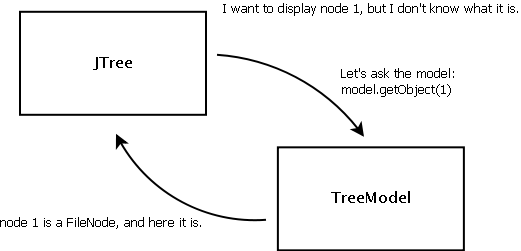
JTree=s on their own are pretty dumb: they can’t do much. One thing they are good at though, is to get others to do their job. For example, to display the nodes, it asks the =TreeModel what these nodes are.

17.png

They don’t know how to display either: they need to use other types of objects, called renderers.

In the previous episode of the JTree saga, we were displaying folders and files, but one problem that we didn’t mention was that empty folders, or folders that are not accessible, were displayed with a “file” icon. The reason for this is that getChildrenCount(Object node) in our model returns 0 for these folders, so JTree treat them as leaves.

We are going to fix this by using a TreeCellRenderer. In FilePreviewer, we now add the following:

tree.setCellRenderer(new DefaultTreeCellRenderer() {

     @Override
     public Component getTreeCellRendererComponent(
             JTree tree,
             Object value,
             boolean sel,
             boolean expanded,
             boolean leaf,
             int row,
             boolean hasFocus) {

         // Call parent rendering to keep the default behaviour
         super.getTreeCellRendererComponent(
                 tree, value, sel,
                 expanded, leaf, row,
                 hasFocus);

         // And now specific stuff
         File currentFile = (File) value;
         // If the current node is a directory, and if it has no child,
         // or if they are not accessible, change the icon.
         if (currentFile.isDirectory() && (currentFile.list() == null || currentFile.list().length == 0)) {
             if (expanded) {
                 setIcon(openIcon);
             } else {
                 setIcon(closedIcon);
             }
         }

         return this;
     }
 });

Our renderer calls the default rendering, and for folders whose children either don’t exist or are not accessible, we change the icon: if the node is expanded, we use openIcon, other we use closedIcon.

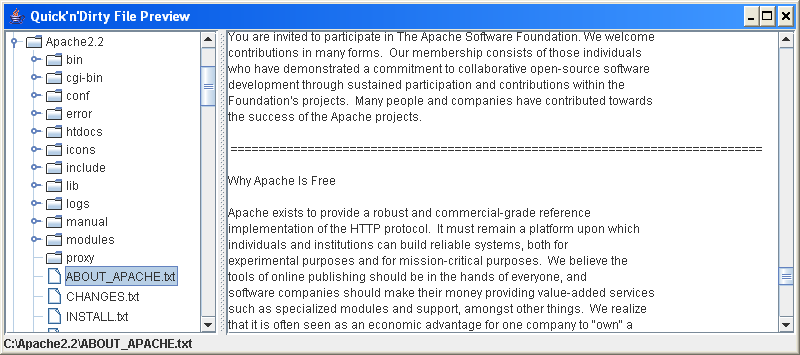
Adding a bit of sorting, we start to get a nice file previewer:

import java.io.File;
import java.util.Arrays;
import java.util.Collections;
import java.util.Comparator;
import java.util.List;

import javax.swing.event.TreeModelListener;
import javax.swing.tree.TreeModel;
import javax.swing.tree.TreePath;

public class FileSelectorModel implements TreeModel {

    private FileNode root;

    /**
    * the constructor defines the root.
    */
    public FileSelectorModel(String directory) {
        root = new FileNode(directory);
    }

    public Object getRoot() {
        return root;
    }

    /**
    * returns the <code>parent</code>’s child located at index <code>index</code>.
    */
    public Object getChild(Object parent, int index) {
        FileNode parentNode = (FileNode) parent;
        List<File> children = getSortedChildren(parentNode);

        return new FileNode(parentNode,
                            children.get(index).getName());
    }

    /**
    * returns the number of child.  If the node is not a directory, or its list of children
    * is null, returns 0.  Otherwise, just return the number of files under the current file.
    */
    public int getChildCount(Object parent) {
        FileNode parentNode = (FileNode) parent;
        if (parent == null
                || !parentNode.isDirectory()
                || parentNode.listFiles() == null) {
            return 0;
        }

        return parentNode.listFiles().length;
    }

    /**
    * returns true if {{@link #getChildCount(Object)} is 0.
    */
    public boolean isLeaf(Object node) {
        return (getChildCount(node) == 0);
    }

    /**
    * return the index of the child in the list of files under <code>parent</code>.
    */
    public int getIndexOfChild(Object parent, Object child) {
        FileNode parentNode = (FileNode) parent;
        FileNode childNode = (FileNode) child;

        List<File> children = getSortedChildren(parentNode);

        return children.indexOf(childNode);
    }

    private List<File> getSortedChildren(File node) {
        List<File> children = Arrays.asList(node.listFiles());
        Collections.sort(children, new Comparator<File>() {

            public int compare(File o1, File o2) {
                if (o1.isDirectory() == o2.isDirectory()) {
                    return o1.getName().compareTo(o2.getName());
                }

                if (o1.isDirectory()) {
                    return -1;
                }

                return 1;
            }
        });

        return children;
    }

    // The following methods are not implemented, as we won’t need them for this example.

    public void valueForPathChanged(TreePath path, Object newValue) {
    }

    public void addTreeModelListener(TreeModelListener l) {
    }

    public void removeTreeModelListener(TreeModelListener l) {
    }
}

And in the FilePreviewer class, I’ve added a split pane:

import java.awt.*;
import java.io.*;
import javax.swing.*;
import javax.swing.event.*;
import javax.swing.tree.DefaultTreeCellRenderer;

public class FilePreviewer extends JFrame {

    private JTree tree;
    private JTextArea preview;
    private JLabel status;

    public FilePreviewer(String directory) {
        tree = new JTree(new FileSelectorModel(directory));

        preview = new JTextArea();
        preview.setWrapStyleWord(true);
        preview.setLineWrap(true);
        preview.setEditable(false);

        status = new JLabel(directory);

        tree.addTreeSelectionListener(new TreeSelectionListener() {

            public void valueChanged(TreeSelectionEvent e) {
                FileNode selectedNode = (FileNode) tree.getLastSelectedPathComponent();
                status.setText(selectedNode.getAbsolutePath());
                if (selectedNode.isFile()) {
                    preview.setText(null);
                    try {
                        BufferedReader br = new BufferedReader(new FileReader(selectedNode.getAbsolutePath()));
                        String line = "";
                        while ((line = br.readLine()) != null) {
                            preview.append(line);
                            preview.append(System.getProperty("line.separator"));
                        }
                    } catch (Exception exc) {
                        exc.printStackTrace();
                    }
                }
            }
        });
        tree.setCellRenderer(new DefaultTreeCellRenderer() {

            @Override
            public Component getTreeCellRendererComponent(
                    JTree tree,
                    Object value,
                    boolean sel,
                    boolean expanded,
                    boolean leaf,
                    int row,
                    boolean hasFocus) {

                // Call parent rendering to keep the default behaviour
                super.getTreeCellRendererComponent(
                        tree, value, sel,
                        expanded, leaf, row,
                        hasFocus);

                // And now specific stuff
                File currentFile = (File) value;
                // If the current node is a directory, and if it has no child,
                // or if they are not accessible, change the icon.
                if (currentFile.isDirectory() && (currentFile.list() == null || currentFile.list().length == 0)) {
                    if (expanded) {
                        setIcon(openIcon);
                    } else {
                        setIcon(closedIcon);
                    }
                }

                return this;
            }
        });

        JSplitPane split = new JSplitPane(JSplitPane.HORIZONTAL_SPLIT,
                new JScrollPane(tree),
                new JScrollPane(preview));
        split.setContinuousLayout(true);

        getContentPane().add(BorderLayout.SOUTH, status);
        getContentPane().add(split);

        setSize(800, 600);
        setDefaultCloseOperation(JFrame.EXIT_ON_CLOSE);
        setTitle("Quick’n’Dirty File Preview");
        setVisible(true);
    }

    public static void main(String[] args) {
        new FilePreviewer(File.listRoots()[1].getAbsolutePath());
    }
}

The final small change is in FileNode: we display the path is the name is empty, so that the root appears correctly:

public class FileNode extends java.io.File {

    public FileNode(String directory) {
        super(directory);
    }

    public FileNode(FileNode parent, String child) {
        super(parent, child);
    }

    @Override
    public String toString() {
        return (getName().length() == 0 ? getPath() : getName() );
    }
}
18.png